| Support Category: SSO |
| Specialist Notes: |
DOC NTIA now utilizes SSO as well to access the CLC.
Please use the following document the DOC Administrators have provided us to assist users with activating their DOC IDMS Account, creating an account, and/or logging into the CLC using the SSO method.
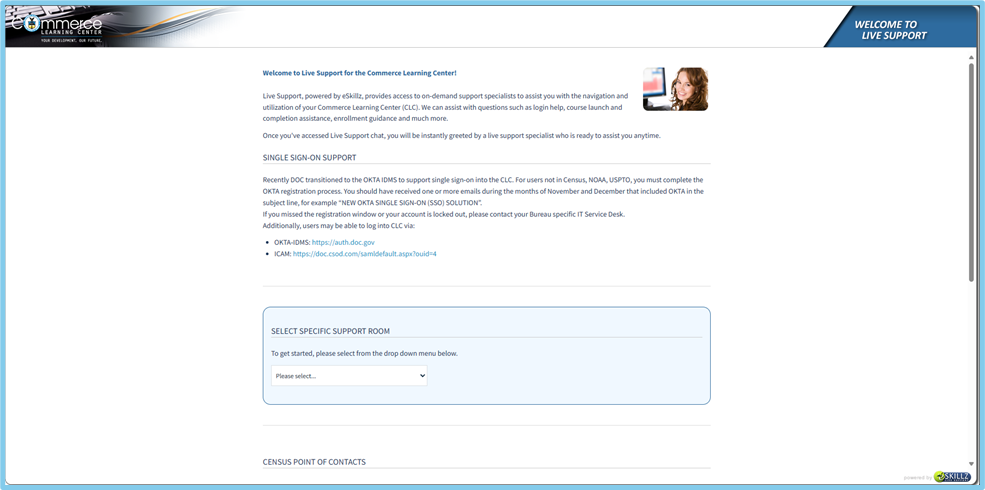
IMPORTANT! Please use this document as a guide rather than share it with users. Should users experience any issues, please use the SSO | Login Issues SR to troubleshoot and assist. Though users should see the message in the Standard Response on the Live Support Page before contacting us [see below], some may still reach out to us for assistance.
We should still provide the below SR just in case they may have missed it and need further assistance. |
| Standard Response: |
Kindly note that DOC NTIA CLC Administrators have advised that you should have received an email advising about the switch to OKTA and what would be needed to utilize SSO moving forward. Please adhere to the following message from the CLC support page and should you remain unable to login after, reach out to NTIA IT team:
_________________________________________________________________________________________________________________________________________
SINGLE SIGN-ON SUPPORT
Recently DOC transitioned to the OKTA IDMS to support single sign-on into the CLC. NTIA users must complete the OKTA registration process. You should have received one or more emails during the months of November and December that included OKTA in the subject line, for example “NEW OKTA SINGLE SIGN-ON (SSO) SOLUTION”.
If you missed the registration window or your account is locked out, please contact your Bureau specific IT Service Desk.
Additionally, users may be able to log into CLC via:
· OKTA-IDMS: https://auth.doc.gov
· ICAM: https://doc.csodfed.com/samldefault.aspx?ouid=4
